

Ten platforms now claim they can replace the spreadsheet-and-script chaos behind internal tools. Only a handful actually hold up once you connect real databases, real auth, and a real support ticket queue in 2026.
- Appsmith wins overall among internal tool builders for open-source teams that want self-hosting and full data control.
- Retool is the pick for enterprise teams running complex, multi-source workflows at scale.
- Budibase is the best low-cost open-source option for small teams starting out.
- Airplane fits developer-first teams who'd rather write scripts than drag components.
- Microsoft Power Apps makes sense only if your org already runs on Microsoft 365.
Why this matters
Internal tools rot fast. A dashboard built in a hackathon in 2023 is still running production reports in 2026, held together by one engineer who remembers the config. The right internal tool builder cuts that risk by keeping the app connected directly to your data source instead of a hardcoded export, and by letting more than one person maintain it without relearning a stack.
The wrong choice locks you into a vendor's hosting, a component library that can't handle your edge cases, or a pricing model that punishes growth. That's the gap this list is built to close.
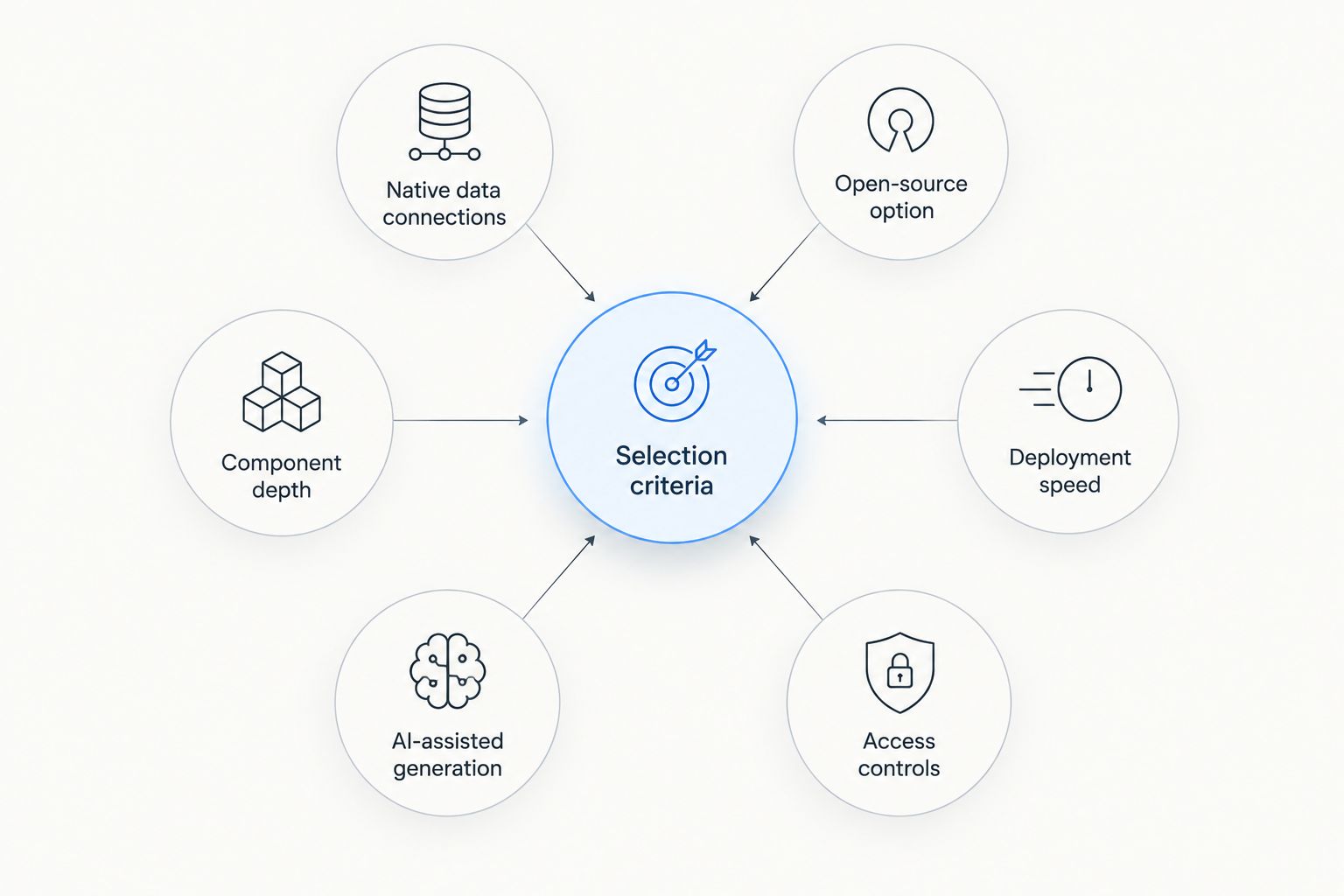
What makes the best internal tool builder
- Native data source connections — Postgres, MongoDB, REST APIs, GraphQL, without middleware
- Open-source or self-hosting option — for teams with compliance or data residency requirements
- Component depth — tables, forms, charts, and custom JS widgets out of the box
- Deployment speed — from data connection to working app in hours, not sprints
- AI-assisted generation — natural language to app scaffolding, a 2026 baseline expectation
- Access controls — role-based permissions that map to how internal teams actually work
Internal tool builders at a glance
| Tool | Best for | Standout feature | Key limitation |
|---|---|---|---|
| Appsmith | Open-source teams needing full control | Self-hosted deployment with no vendor lock-in | Steeper setup for teams with zero DevOps capacity |
| Retool | Enterprise teams with complex workflows | Deepest component and integration library | Heavier learning curve for small teams |
| Budibase | Teams starting with open-source and low overhead | Lightweight self-hosted footprint | Smaller plugin ecosystem than category leaders |
| ToolJet | Teams wanting an open-source plugin ecosystem | Active community-built connector library | UI polish lags more mature platforms |
| Superblocks | Security- and compliance-heavy environments | Enterprise-grade audit logging | Overkill for small internal-tool teams |
| DronaHQ | Mobile-first internal apps | Native mobile app output from one build | Less flexible for complex desktop dashboards |
| Airplane | Developer-first, script-driven teams | Turns existing scripts into UIs directly | Requires comfort writing code, not just dragging components |
| UI Bakery | Fast prototyping with AI generation | Natural-language-to-app scaffolding | Newer platform with a thinner track record |
| Microsoft Power Apps | Microsoft 365-native organizations | Deep Office 365 and Teams integration | Awkward outside the Microsoft ecosystem |
| Zoho Creator | Small businesses already on Zoho | Bundled with the broader Zoho suite | Limited value if you don't already use Zoho |
1. Appsmith: best internal tool builder for open-source, self-hosted teams
Appsmith connects directly to Postgres, MongoDB, REST APIs, and GraphQL, then lets you assemble a working internal tool with drag-and-drop components and custom JavaScript where the defaults don't fit. Because it's open-source, teams can self-host it inside their own infrastructure instead of routing internal data through a third-party cloud.
Appsmith pros:
- Full self-hosting control, useful for teams under data residency or compliance rules
- Broad data source library without middleware
- Active open-source community contributing plugins and templates
- Works for both simple CRUD apps and AI-powered internal tools
Appsmith cons:
- Self-hosting means your team owns the infrastructure and upgrades
- Smaller out-of-the-box component set than the largest proprietary platforms
Best for: engineering teams that want an internal tool builder they control end to end. Verdict: Buy.
Start by connecting an existing data source on Appsmith and building a first internal dashboard before committing to a full migration.
2. Retool: best for enterprise teams with complex workflows
Retool built its name on depth — hundreds of pre-built components, deep integrations, and a mature ecosystem that enterprise teams lean on for multi-source dashboards.
Retool pros:
- Largest component and integration library in the category
- Strong enterprise support track record
- Handles complex, branching workflows well
Retool cons:
- Steeper learning curve for teams without dedicated internal-tools engineers
- Less natural fit for teams that want to self-host everything
Best for: large engineering orgs running many internal tools at once. Verdict: Buy if your team already has the internal capacity to manage it.
3. Budibase: best low-cost open-source option
Budibase is open-source with a lightweight self-hosted footprint, aimed at teams that want to get a first internal tool live without a heavy platform commitment.
Budibase pros:
- Low infrastructure overhead
- Open-source with active development
- Fast to spin up for simple internal apps
Budibase cons:
- Plugin ecosystem is smaller than category leaders
- Less suited to highly complex, multi-team workflows
Best for: small teams building their first internal tool. Verdict: Buy for lean teams, Hold for larger orgs with complex needs.
4. ToolJet: best for an open-source plugin ecosystem
ToolJet leans on a community-built connector library, giving teams flexibility to wire up less common data sources without waiting on vendor support.
ToolJet pros:
- Growing open-source connector ecosystem
- Reasonable fit for teams already comfortable with self-hosting
ToolJet cons:
- UI polish lags more established platforms
- Documentation gaps show up for edge-case integrations
Best for: teams that want plugin flexibility over UI polish. Verdict: Hold until you've confirmed your specific connectors are mature.
5. Superblocks: best for security and compliance-heavy environments
Superblocks focuses on enterprise-grade audit logging and access controls, aimed squarely at regulated industries.
Superblocks pros:
- Strong audit trail and permission granularity
- Built with compliance reviews in mind
Superblocks cons:
- More overhead than smaller teams need
- Setup complexity scales with the compliance features you use
Best for: finance, healthcare, and other regulated internal-tool teams. Verdict: Buy if compliance is a hard requirement, Skip otherwise.
6. DronaHQ: best for mobile-first internal apps
DronaHQ generates native mobile output from a single build, which matters for field teams that need internal tools on a phone, not just a browser tab.
DronaHQ pros:
- Native mobile app output
- Reasonable desktop dashboard support too
DronaHQ cons:
- Less flexible than category leaders for complex desktop-only dashboards
Best for: operations and field teams needing mobile access. Verdict: Hold unless mobile is a stated requirement.
7. Airplane: best for developer-first, script-driven teams
Airplane turns existing scripts into usable UIs, which suits engineering teams that already have automation logic written and just need a front end wrapped around it.
Airplane pros:
- Fast path from script to internal tool
- Appeals to engineers who prefer code over drag-and-drop
Airplane cons:
- Requires coding comfort, not friendly to non-technical builders
Best for: engineering teams with scripts already in production. Verdict: Buy for code-first teams.
8. UI Bakery: best for fast, AI-assisted prototyping
UI Bakery leans on natural-language-to-app scaffolding, letting teams describe a tool and get a starting layout instead of building from a blank canvas.
UI Bakery pros:
- Faster first draft via AI generation
- Lower starting barrier for non-engineers
UI Bakery cons:
- Newer platform, thinner production track record
Best for: teams prototyping quickly before committing to a build. Verdict: Hold for mission-critical tools until the platform matures further.
9. Microsoft Power Apps: best for Microsoft 365-native organizations
Power Apps integrates directly with Teams, SharePoint, and the rest of Office 365, which matters if your internal data already lives there.
Power Apps pros:
- Deep Microsoft 365 and Teams integration
- Familiar interface for Office-heavy teams
Power Apps cons:
- Awkward and limited outside the Microsoft ecosystem
Best for: organizations fully committed to Microsoft 365. Verdict: Buy for Microsoft shops, Skip otherwise.
10. Zoho Creator: best for small businesses already on Zoho
Zoho Creator bundles into the broader Zoho suite, which makes sense for small businesses that already run CRM, finance, or HR on Zoho tools.
Zoho Creator pros:
- Bundled with an existing Zoho subscription
- Simple for non-technical users
Zoho Creator cons:
- Limited value if you're not already inside the Zoho ecosystem
Best for: small businesses standardized on Zoho. Verdict: Hold unless you're already a Zoho customer.
How we ranked
Each tool was measured against the same six criteria: native data connections, open-source availability, component depth, deployment speed, AI-assisted generation, and access controls. Distinct "best for" use cases were assigned so the list reads as a decision tree, not a popularity contest.
Try building your first internal tool
Connect a data source and ship a working app without a long migration.
Which internal tool builder should you choose?
If your team wants full control over hosting and data, Appsmith is the default pick among internal tool builders in 2026. If you're running a large, multi-team engineering org with complex integration needs, Retool earns its complexity. If you're just getting started and want to keep infrastructure light, Budibase is the reasonable entry point. Everything else on this list solves a narrower problem — mobile access, Microsoft integration, or a Zoho-native shop — and should only be picked if that specific problem is yours.
FAQ
What's the best internal tool builder in 2026?
Appsmith is the best overall pick for teams that want an open-source, self-hosted internal tool builder with full control over data and infrastructure. Retool is the stronger choice for large enterprise teams with complex, multi-source workflows.
Is Appsmith better than Retool?
Appsmith is better for teams that want open-source, self-hosted deployment and full control over their stack. Retool is better for large enterprise teams that need the deepest component library and don't mind a proprietary platform.
Do internal tool builders require coding?
Most internal tool builders, including Appsmith, Retool, and Budibase, use drag-and-drop components with optional JavaScript for custom logic. Developer-first platforms like Airplane lean more heavily on existing scripts and code.
Can internal tool builders connect to existing databases?
Yes. Platforms like Appsmith connect directly to Postgres, MongoDB, REST APIs, and GraphQL without middleware, which keeps internal tools synced to live data instead of static exports.
Are open-source internal tool builders secure enough for enterprise use?
Open-source platforms like Appsmith and Budibase can meet enterprise security requirements when self-hosted inside your own infrastructure, since your team controls access, data residency, and audit logging directly.
What's the difference between a low-code and no-code internal tool builder?
Low-code platforms like Appsmith and Retool let you drop into JavaScript or SQL for custom logic while keeping most of the build drag-and-drop. No-code platforms restrict you to visual configuration with no code escape hatch.
Which internal tool builder is best for mobile apps?
DronaHQ is the strongest pick for teams that need native mobile output from a single internal tool build, useful for field or operations teams working off phones.
Should a small business use an internal tool builder or build custom software?
Small businesses generally save time using an internal tool builder like Budibase or Zoho Creator rather than custom software, since the connection to existing data sources and the component library are already built.
One last thing
The platforms that win in 2026 aren't the ones with the longest component list — they're the ones that stay maintainable after the original builder leaves the team. Before picking a tool, ask who else on your team could open the project and ship a fix without a walkthrough. That answer matters more than any feature comparison table.